Knowhow of logging information.(Total data)
|
This page details knowhow of logging information.(Total data).
|
-
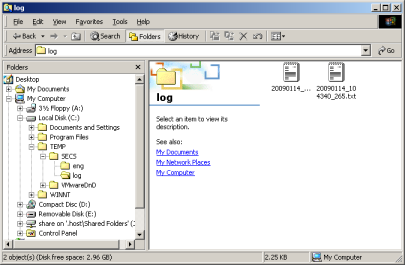
Open the folder set by "SECS Log Directry" of the Setting Window by the Explorer.
See "Details setting of the output directory etc.".

< Back | Next >
-
Open the Total logging file that you want to check by Text-Editor or Viewer like Note-Pad.

In default, extension of Total logging file is ".csv".
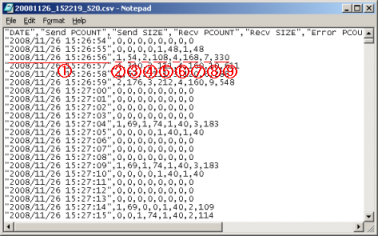
The logging file name format is "YYYYMMDD_HHmmSS_MS.csv"(MS:MicroSec.).
You will only have to select a near file name according to the date that you want to check, and to open.
|
Number in Figure
|
Content
|
|
1
|
Date and Time when Total data was logged.
2007/08/23 17:15:29 : Date and Time when Total data was logged.(Date Time)
|
|
2
|
Count of sent packet.
|
|
3
|
Byte size of sent packet.
|
|
4
|
Count of received packet.
|
|
5
|
Byte size of received packet.
|
|
6
|
Count of unknown packet
|
|
7
|
Byte size of unknown packet.
|
|
8
|
Count of found packet
|
|
9
|
Byte size of found packet
|
< Back |
|
|
|
Last Updated on Sunday, 29 March 2009 05:37 |