
BE-GRAPH.COM 取り扱い製品
SECS Serial Logger(Monitor)
半導体SECS(SECS-I)通信のデバッグにお困りではありませんか?

|
|
半導体SECS-I通信をデバッグする時など、どのように情報が流れたか、詳細なメッセージの中身を確認したい場合に、これさえあれば、簡単に確認できます。
本製品は、USBフラッシュメモリにプレインストールされた形で提供されます(正規版)。 そのため、リリースした後、どうもうまく情報が流れていないようだ・・・など確認する時にターゲットのPCへ製品版で提供されるUSBメモリを挿して実行するだけで簡単にSECSのメッセージを確認することができます。
本製品は、USBフラッシュメモリにプレインストールされた形で提供されます(正規版)。 そのため、リリースした後、どうもうまく情報が流れていないようだ・・・など確認する時にターゲットのPCへ製品版で提供されるUSBメモリを挿して実行するだけで簡単にSECSのメッセージを確認することができます。
SECS Packet Logger(Monitor)
半導体SECS(HSMS)通信のデバッグにお困りではありませんか?

|
|
半導体HSMS通信をデバッグする時など、どのように情報が流れたか、詳細なメッセージの中身を確認したい場合に、これさえあれば、簡単に確認できます。
本製品は、USBフラッシュメモリにプレインストールされた形で提供されます(正規版)。 そのため、リリースした後、どうもうまく情報が流れていないようだ・・・など確認する時にターゲットのPCへ製品版で提供されるUSBメモリを挿して実行するだけで簡単にSECSのメッセージを確認することができます。
レジストリを一切汚しません。(Windows XP,2000 のみ)
本製品は、USBフラッシュメモリにプレインストールされた形で提供されます(正規版)。 そのため、リリースした後、どうもうまく情報が流れていないようだ・・・など確認する時にターゲットのPCへ製品版で提供されるUSBメモリを挿して実行するだけで簡単にSECSのメッセージを確認することができます。
レジストリを一切汚しません。(Windows XP,2000 のみ)
Paint Post Card(絵葉書)
「見られたくない」メールやファイルがありませんか?
|
|
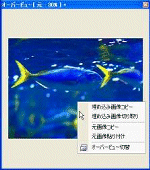
例えば、インターネットエクスプローラ(R)の画像のコピーから、PaintPostCard のオーバービュー画面へ貼り付けるだけでその画像に何か情報が入っているか確認できます。
また、メールに添付するのもドラッグ&ドロップするだけで簡単に添付することができます。
OutLookExpress(R)などから、もらったメールの添付画像ファイルをコピーして貼り付けても同じように確認ができます。
テキスト編集画面もついて、簡単にメールでやり取りできます。
また、メールに添付するのもドラッグ&ドロップするだけで簡単に添付することができます。
OutLookExpress(R)などから、もらったメールの添付画像ファイルをコピーして貼り付けても同じように確認ができます。
テキスト編集画面もついて、簡単にメールでやり取りできます。
BeZIP 日本語対応版
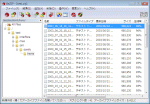
日本語のファイル名で圧縮・解凍できなかったことはありませんか?
|
BeZIP 日本語対応版 では、そのような問題を全て解消しました。
※本製品は、BeOS及びBeOSに対応しているBeZIP及びそれに関連する非営利団体とは、一切関係ありません。 |
例えば、日本語のマルチバイトコード「ソ」には、「\」のバイト情報を含む文字列のためにディレクトリ制御に問題がありました。
BeZIPでは、それらの問題を取り除き日本語への対応を行い、且つ、自己解凍型のセキュリティアップのために独自のパスワード制御を行うことが できるようになりました。
BeZIPでは、それらの問題を取り除き日本語への対応を行い、且つ、自己解凍型のセキュリティアップのために独自のパスワード制御を行うことが できるようになりました。
[ お問い合わせ先 ]
弊社、取り扱い製品の問い合わせ先/ご購入希望の申し込み先は、下記のまでお気軽にお問い合わせください。
有限会社 ビーグラフ
TEL : 092-985-8677
e-mail :
※問い合わせ・ご相談は、お気軽にどうぞ。
※本ページ及び、以降に出てくる全ての Windows及び各OS名称は、株式会社マイクロソフトの登録商標です。
弊社、取り扱い製品の問い合わせ先/ご購入希望の申し込み先は、下記のまでお気軽にお問い合わせください。
有限会社 ビーグラフ
TEL : 092-985-8677
e-mail :
※問い合わせ・ご相談は、お気軽にどうぞ。
※本ページ及び、以降に出てくる全ての Windows及び各OS名称は、株式会社マイクロソフトの登録商標です。