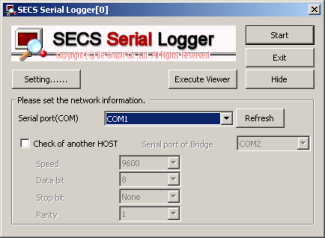
If you want to watch Serial port of another PC, you will check this.
And you will set IP Addr that you want to check of another PC to “IP Adress of another HOST”.
[Commentary]
More, You must set hardware.
It is that connect use a shared hub between PC that works this software and PC that wants to check.
You must not use switching hub.
‘Watch another HOST’ means to prepare PC besides target PC of logging, and to do logging with the PC.
This function is useful functions when you want to do logging on old OS or besides Windows OS.
You need not change at setting of target PC and equipment when you want to use this function.
This function explains the execution method as follows.
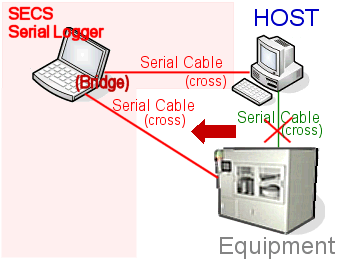
- Use of Serial Bridge
[To prepare.]
-
Serial port x2 is necessary for PC that executes logging.
- Both are connected with the cross cable between between target PC and SECS Serial Logger execution PC and the equipment.
Following screen information is matched to the connection of target PC and the semiconductor equipment.
| ‘Speed’ |
Speed
- 110
- 300
- 600
- 1200
- 2400
- 4800
- 9600
- 14400
- 19200
- 38400
- 56000
- 57600
- 115200
- 128000
- 256000
|
| ‘Data bit’ |
Data bit
|
| ‘Parity’ |
Parity
|
‘Stop bit’
|
Stop bit
|
- You need not change at setting of target PC and equipment when you want to use this function.
< Back |
Next >